
Work backwards
This is a demo, open for everybody. A free account opens 140+ applications; Plus opens all of them.
Make a free account Log inWhat this application teaches
- I can follow a number through a chain of steps.
- I can go back from the result by undoing the steps in the opposite order.
- I can write the equation of a chain and check the answer.
How to use it
Aim: Build your own chain of up to 5 steps (add, subtract, multiply by, divide by) and choose the result. The blue arrows go forward from x, the orange arrows go back from the result with the opposite operation. The equation of the chain is written for you. Type a guess for x to run it through the chain.
- Choose a step with the arrows (Add, Subtract, Multiply by, Divide by) and type the number.
- Press Add step. Undo step removes the last one.
- Choose the result at the end of the chain and read the equation.
- Press Step back to undo the last step first, then the one before it. All steps shows everything.
- Type a guess for x: it is run forward through the chain and compared with the result.
- At the end the answer is checked. Try an example loads a ready-made chain.
Tip for teachers: Ask the pupils to say the next backward number before they press Step back.
Fits these school years
IB (MYP, Diploma): MYP 1, MYP 2, MYP 3, MYP 4, MYP 5
Cambridge International: Lower Secondary, stage 7, Lower Secondary, stage 8, Lower Secondary, stage 9, IGCSE
Netherlands: Year 2, Year 3 (havo, vwo), Vmbo kb (years 3-4), Vmbo gt (years 3-4), Havo · Mathematics A, Havo · Mathematics B, Vwo · Mathematics B
Türkiye (MEB): Year 7 (MEB), Year 8 (MEB)
England (GCSE, A Level): Year 7, Year 8, Year 9
USA (Common Core): Grade 7, Grade 8, Algebra 1
Similar applications
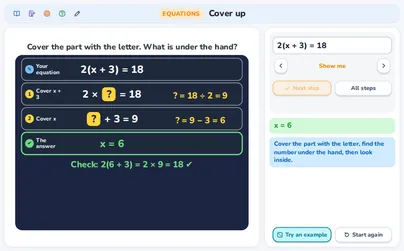
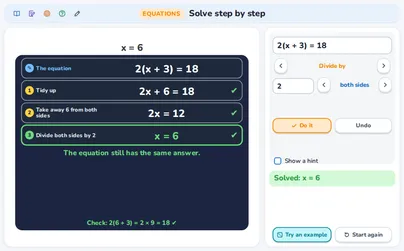
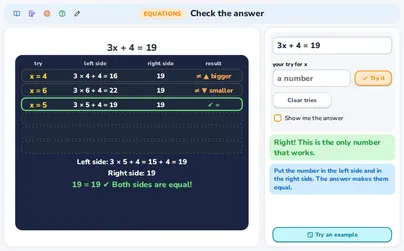
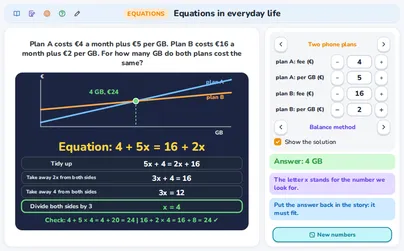
Read the lecture notes: Solve linear equations: backtrack, cover up, balance