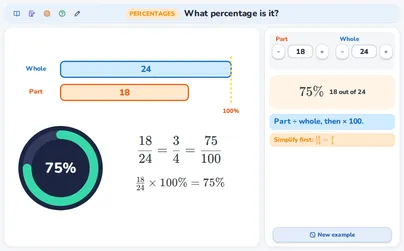
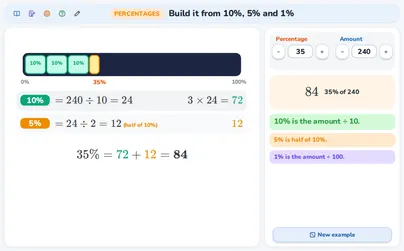
The percentage bar: a percentage of an amount
This is a demo, open for everybody. A free account opens 140+ applications; Plus opens all of them.
Make a free account Log inWhat this application teaches
- I can find a percentage of an amount, for example 35% of 80.
- I know that 100% is the whole amount and 1% is the amount ÷ 100.
- I can use 50%, 25% and 10% as shortcuts.
- I understand what a percentage above 100% means.
- I can write a percentage of an amount as a times-sum with a decimal number or a fraction: 25% of 60 is 0.25 × 60 = 1/4 × 60 = 15.
How to use it
Aim: The bar is the whole amount: 100%. You see how big a percentage is, and you find it in two ways: through 1% and through 10%. A second view of the same answer: a percentage as a times-sum.
- Set the Amount with − and + or type it. This is 100%.
- Set the Percentage. The green part of the bar grows.
- Read the answer under the bar and in the result card.
- Follow the route: 100% → ÷ 100 → 1% → × percentage.
- Try 20%, 30% or 60%: a second route through 10% appears.
- Try more than 100%: the bar goes past the whole (gold).
- Press New example for a new task.
- At the bottom of the right-hand column use the switch to go from Bar steps to Times a decimal or fraction. The bar stays. Under it two rows write the same answer as a times-sum: As a decimal (set Amount 60 and Percentage 25: 25% = 0.25, so 0.25 × 60 = 15) and As a fraction (25% = 1/4, so 1/4 × 60 = 15). For 40% the rows read 0.4 × 60 and 2/5 × 60, and both are 24.
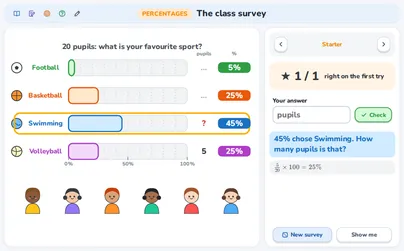
- Under the rows is a question with three sums and three levels (Starter, Explorer, Champion): at the first two you choose the sum that gives the percentage of an amount, at Champion the sum that does NOT give it. At Starter the wrong sums are the ones that forget that a percentage is a part out of 100: 2.5 × 60 = 150 and 25 × 60 = 1 500 do not give 25% of 60. A wrong pick is marked and gets a hint; Next question gives another one. The question has its own percentage and amount.
- Nothing you type or choose in this application is sent anywhere. The keyboard works too: Tab moves from control to control, Enter (or the space bar) presses a button, the up and down arrow keys change the number in a box and Esc closes a help window.
Tip for teachers: First ask: “What is 50% of 80? And 25%?” Let the pupils guess, then show it on the bar. Then let them find 35% of 80 on their own (in BBB: Everyone explores). For per mille and for a percent of a percent drawn on a bar, open “Percent, percentage point and per mille”. Ask: “Is 25% of 60 the same as 25 × 60?” The examples are original.
Fits these school years
IB (MYP, Diploma): PYP, MYP 1, MYP 2, MYP 3
Cambridge International: Primary, stage 6, Lower Secondary, stage 7, Lower Secondary, stage 8
Netherlands: Groep 7, Groep 8, Year 1, Year 2, Havo · Mathematics A, Vwo · Mathematics A, Vwo · Mathematics C
Türkiye (MEB): Year 6 (MEB), Year 7 (MEB)
England (GCSE, A Level): Year 6, Year 7, Year 8, Year 9
USA (Common Core): Grade 6, Grade 7