Back to the lecture notes: Scalar product and 3D vectors
Vectors in 3D: points, arrows and i, j, k
This is a demo, open for everybody. A free account opens 140+ applications; Plus opens all of them.
Make a free account Log inWhat this application teaches
- I can read the picture of space and write the coordinates and the column of a point or an arrow in space.
- I can find the length of a vector in space, the distance between two points and a midpoint.
- I can add, subtract and scale vectors in space, find a unit vector and write a vector with i, j and k.
How to use it
Aim: Put a point or an arrow in space and read how far along i, along j and up: the column, the length, the distance between two points and the midpoint, and the sum, the difference and multiples of vectors, all with your own numbers.
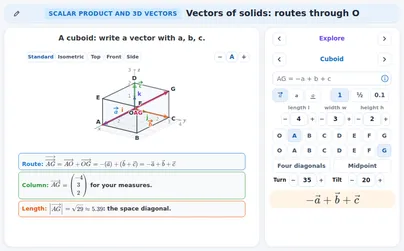
- In Explore open Point and arrow. Drag the foot (the open circle on the floor) and the top (the diamond) of P, or type x, y and z, or type one line like 2i - j + 3k. Point, Vector or Both shows the point, the arrow from O or both; Faint box draws the box. The board gives the Column, the Steps along i, j and k and the Length.
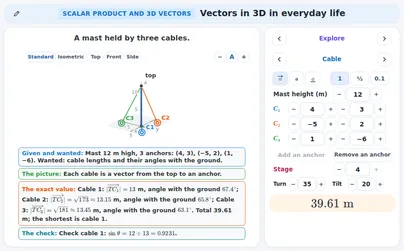
- Turn the picture by dragging its background, with the arrow keys when it is selected, or with the Turn and Tilt steppers; Standard, Isometric, Front and Side (and the view from above) choose a view at once. The board always gives the numbers, so you never have to measure the picture.
- The three buttons next to the numbers switch how the names are written: with an arrow, bold or underlined (all three mean the same vector), and the snap 1, ½ or 0.1.
- Open Length and distance: two points A and B. Origin to A shows only the arrow from O to A, A to B the arrow between the two points. The board shows the Two triangles (the floor diagonal, then the arrow), the Vector as end minus start with the distance, and the Midpoint. I know M and A: find B turns it round: from the midpoint M and the point A it finds B.
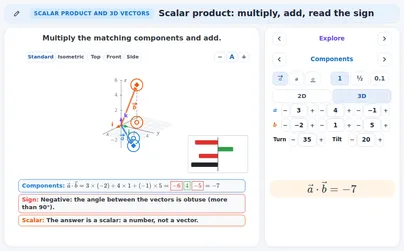
- Open Add and scale: two vectors a and b. Choose a + b, a − b, k a or unit with the four buttons; the number for k a is Multiplier k. The board shows the Sum, the Difference, the Multiple or the Unit vector, with the Lengths.
- Open i, j, k: type a vector like 2i - j + 3k in the one-line field. The board shows Both forms (the column and the sum of i, j, k), the Unit steps (a staircase: i, then j, then k) and that i, j and k are Perpendicular and have length 1.
- In Guess first choose the answer before you look at the picture; then Next one gives another question.
- In Practice choose a level (Starter, Explorer or Champion), type or choose the answer and press Check. A vector can be typed as (3 ; 2 ; 1), 3 2 1 or 3i + 2j + k. Stuck? Press Hint; Next step shows the solution one step at a time and Show answer gives the answer. Step by step switches the help.
Tip for teachers: Ask for the three legs before the arrow: how many steps along i, along j, up? Then turn the picture and show that the numbers on the board do not change, only the picture does.
Fits these school years
IB (MYP, Diploma): Diploma, year 1, Diploma, year 2
Cambridge International: A Level
Netherlands: Vwo · Mathematics D, Vwo · Mathematics B
England (GCSE, A Level): Year 13 (A Level)
USA (Common Core): Precalculus